ah thats so cool, you're the first i've heard trying that! i experimented with that myself when testing to see if they work as a ladder and its pretty fun
you can also sandwich two conveyors together to go vertically if they are upgraded a bit but its quite fiddly...
there will be more levels like this going forward :)
I used conveyor belts. and some fans to get it to the top of the hill. then had a belt up top that would just drop them in, add a slide or two for when the logs get stacked and hit each other and it worked perfectly. then i decided to have a ton of fun and use just fans.
definitely not too late. not as many people use the site as before, but the vibe of the game is there. though 6 levels is maybe too few for a demo there. you should still be compensated for your work. its a hard line to walk. most people put games online for free back in the day, but then it was mostly for fun.
1) Panels are one of the most useful tools. They allow to store a huge amount of logs and let them burn all in one go. Just select the panel holding the logs. It automatically moves it and let the logs pass.
2) Slides are horrible to use. Because the game physics counts pixels, if they are not properly aligned, the logs will stop sliding when they intersect.
3) Fans can be used to move logs instead of using the mouse grab. Mouse grab is terrible, because the logs keep moving freely. Prefer to use the fan to sweep the logs.
4) Trampolines are glitchy. Their hitbox allows logs to pass through when there are multiple logs colliding at the same time. Also, they become unselectable when covered by logs.
5) Even though each level requires some brain, the easiest way to beat any of them is to let it run for some time, buy a large amount of tools and them finish all quests/objectives.
thanks for playing and for the feedback! will look into the trampolines as that seems off. Also yeah the slides things, there's one thing i could try without making a whole snapping system which im not sure i wanna do lol
Really fun game you did there...again! <3 Love that you can build and play around with the items. It's crafty and allows creativity and I enjoyed coming back every time. To all the others, check out Sporbs as well! It's awesome. Love to follow your work. Keep on doing this! Cheers, Jule
to be hoenst I used this strategy to cheese some of the challenges cause the "reach 2/s" an such challenges only look at how many items are burned in a given time. so if you steadily harvest each one and dump it, one after anotjer. or just collect 100 in a pile and then delete a slate to dump them alla t once into the fire dowesnt matter.which aenugh planning and collecting, you may be able to cheese the "keep >2/s for 15 sec" things too. jsut collect a ton of things in a container.and then open a slit that is chosen in a way that just enough of them roll into the fire at once to keep the needed frequency going.
Fun! IMO wants a bit more complexity in chopping and some more diverse objectives - the heat/s targets are basically just "put 4 auto-choppers on each tree and max out auto-chop speed", which feels kinda formulaic.
valid. i'm looking at adding a bit more complexity to this going forward for sure - along with adding more tree species with different density logs (more processing needed, longer to chop), a good idea someone mentioned is to experiment with adding different sized trees within each species, allowing more or less choppers to be placed there, with more space in-between trees needing more complex routing and bigger builds - as an expample!
Most fun I've had in weeks dude. Please keep creating and building on this game and things like it, it has huge potential. You have the midas touch. It'd be cool to have more precise rotations and maybe some items combos that force you to be really creative also. So excited to see the full thing, this deserves to be the next poly bridge/scritchy scratchy game for sure.
thank you for the kind words! really glad you enjoyed it :))
and for precise rotation, i added some more control in the patch yesterday, you can hold SHIFT+Q/E for extra fine rotation, also if you prefer you can toggle on using your mouse scroll for rotation when you have a tool selected!
Really fun, allows for creativity and mistakes. Sadly logs start disappearing beyond a certain number (or maybe it's timed). Also couldn't reliably get trampoline to do trampoline things (like going up on the fifth map). You can still get the results with conveyors or slides + fans, but I was kinda hoping I could just bounce stuff over the obstacle.
ah yeah i did set a limit for the web build to keep things running smoothly (400...) - i will expose this in the settings so people can bump it up if they want!
it can be fiddly and not the most efficient (but is fun) but did you try shooting them at the trampolines with fans? you can make a funnel and direct them into the trampolines at the rough angle you want, the faster they hit the trampoline the further they bounce! would be hard to complete the required objective with this method but could be possible...
I messed around with it a bit more. Overall, I mostly figured the idea is to use "not that many" tools (maybe due to that one objective requiring use of no more than 4), so setting up physics machines all around just to make trampolines do fun things seemed like an overkill. Now that I've tried it, yeah, it can work, but it's still very inconsistent. Hit the edge of the trampoline and all the momentum dies. Log is rotating during flight - more landing randomness. Two or more logs? Collisions mid-air, collisions on the trampoline, collisions everywhere. And once a trampoline messes up a single log, more will come and things will eventually break.
They work okay for dropping logs down a cliff and bouncing them at 45 degrees or something (as long as there's not too many logs), but for anything else I feel like I need to get the logs up first to get enough gravity for falling logs to make decent use of trampolines. If I use fans for vertical momentum, I don't have enough horizontal, if I use them for horizontal, I lack vertical and at that point I might as well just slinghshot things with a single fan and a slope. I tried going through the game by only using trampolines, but it's a bit tedious. I can't even guarantee the first log dropping properly on a trampoline right below the tree, because the position, orientation and velocity of spawning logs are not consistent.
Other than that a button to remove all tools would be nice, like there's one to clear all logs. And some sort of tutorial/tooltip on how experience is awarded, cause I haven't seen anything about it. And while exp for finishing objectives seems somewhat obvious, even if it's not written anywhere, exp for combos of 5x and above for the first time it's reached in a level was unexpected.
i'll add an option to remove all tools to the right click context menu - and yeah, i didn't communicate the new combo pb xp bonus you are right! Partly because i'm not sure about it as a scalable idea so might drop it and introduce something else, but yeah not good to have systems which aren't communicated!
I wasn't sure how to use the fan at first (the button is small and fiddly compared to the placing) so I deleated it and it counted tward the "earn $" quest, allowing me to cheese that quest (after more testing it seems to do this with every item)
while not needed I'd like a sensitivity slider for the mouse(like the bloom and shake sliders), as of right now it slightly lags behind where the actual mouse is so it can feel floaty at points, that makes it harder to control where the mouse sits and it makes a few misclicks feel slightly annoying
ah thanks so much! that's a great catch i've not noticed that one! and yeah i'll add some cursor control into the QoL settings that'll hopefully help - i think its what i'm doing to replace the system cursor for the in-game one thats making it floaty i'll see if i can fix it up a bit
Having fun with this game, great work. Many QOL features already been told in comments, hope to see some of them in full game
Got a weird bug: i don't get any XP during stage since i reach x20 combo and until i change stage. So change stage -> combo 1 through 20 gives me xp, then have to change stage to get any xp again... but i guess i can keep log income slower to grind levels for now
P.S. I did more testing and it's not only x20 combo. Every new bit of xp requires you to make combo at least 1 higher to get until you switch stages. Quite specific behaviour, but looks strange, so i still think it's a bug
Ah yes you're first to notice this bug! (that switching stages resets your xp gain on reaching new combo pb) - currently fixing this!
but yeah it was a design decision to make it so you only are rewarded on reaching a new combo pb, so that players couldn't just sit in an automated zone gaining infinite xp when combo-ing...so in early game you're rewarded for reaching a new combo.
Hey bug been fixed in recent patch! thanks for the help :) and as it stands, each zone has its own max combo pb record, so you get XP if you improve it - not sure if this will stay but for now thats whats going on
Having fun with the game so far,but the selection function is tripping me up bit.Every time I buy something,I ended up buying more than I want because the game still thinks I am still buying stuff,and as others have brought up the delete function is handy but gets annoying later on in the game.Other than that,I am having a wonderful time
EDIT:
also this is just me,but I personally suggest adding the ability to move across the screen using the mouse.Kinda gets tedious using the keys
to cancel the next tool purchase you can right click (i think i need to add that to the control tips tbf..) - also you can using middle mouse drag/right click drag to pan the camera if youre using a mouse! but this makes me think maybe it should pan if your cursor goes close to the edge of the screen or somehting)
i'll be putting a patch out tomorrow with a load of QoL improvements which improves the delete box and a load of other stuff!
Especially annoying when you buy fans. you are in buy mode. you click somewhere to place fan. you now wanna activate the fan, trying to click on that one miniscule pixel that turns it on. you accidentally place a second fan. you right click a bunch of tiems to remove the additional fan. gotta be careful though that you dont click another time, accidentally clicking remove on the original fan too...
so yeah, can get a bit annoying. or after buying before you do anyhting else, gotta right click on soem epmty land soemwhere before you do toher things.
hey would you like an option in the setting menu to turn off buy-mode after a single tool placement? could be good if there are other people finding this frusstrating!
maybe, actually not too sure on how to solve the issue.
Maybe have space for the "cancel selection/buy menu/anything"? but that would require keyboard button. but alas you use wasd to move camera anyways.
just have left click be left lickk as ususal, right click for the "contect menu".and space to cancel any selection or whatever may be going on.
some people may hate having to use both hands but you cant make everyone happy :-) at least it would make things easier. and yeah, likely havign it be a single purchase eahc time might make sense since unlike other games, you arent really like placing multiple objects in one line or soemthing, so that extra click before each new purchase wont kill anyone. you basically place items one at a time anyway. should howeve,r evne if you are not in the buy menu, still rmember the last orientation of conveyors and such that you last used. so upon next purchse you dont have to rotate to the same angle eahc time but it starts at that last angle by default.
hey i improved the delete section in recent patch and other QoL - check it out! as its come up a couple times, i'm considering adding an option in the settings for the buy mode to turn off after one purchase - if people want to!
After you pointed you,I could turn off purchase mode using right click.It has gotten easier for me(Especially helps since right click can be used to look across the screen),though having that option would be helpful.Or have right click thing be more clear
I do also have another minor complaint.Whenever I pick an object,and carry it somewhere else using the wasd/arrow keys,the mouse gets misplaced and I have to grab the object again.It's not a big deal but it's kinda annoying
It is a really good game. I like if it had a upgrades for the cursor so that i can pickup multiple logs with one hold. The button on fan is so small to press, i really have to zoom in to press it. By far it is an amazing game!
nice sandbox incremental, but im concerned at how late-game is going to be in terms of difficulty/build adaptations, seems like 1-2 meta's will carry me through the game, unless there are some optional objectives forcing me out of them. Still, needs QoL's
turn on/off all machines button
clear all logs (in case of a jam)
stop showing me 3-star result on a level i've already beaten
as well as showing the tasks list on new level
(as it turns out it only applies to last/pre-last levels)
"sell thing" area shouldnt be this big and close to center. Its good that there are no "reduced sell prices" here because i accidentally sold plenty of items because of it
for fine tuning, it would be cool to have "hold button and then use mouse wheel/mouse itself to make fine adjustments, because hold-to-fine tune is a bit timing-sensitive and if its kept - it should be slower
working on QoL for next update so much of this will be fixed/implemented. I'll be making the right click context menu much more useful in general , and adding more options to the settings menu for greater control. Yes combo cap among other thigns will likely be perma upgrades as part of meta progression for full game - yeah i need to make the sell area much less in the way or/and add option to get rid in general - the 3 star point is a great catch.
yep, basically slides and conveyors brign you all the way. and even in the "bring logs over the mountain" kind of level, neeeded like 1 fan and the rest all conveyors.
you should probably add restrictions and stuff in some levels, like conveyors banned, can only use 4 fans max and such
hey yeah, i will be leaning into the restrictions a bit more for required objectives - for this early version i wanted to not punish players too much so i can test base systems and ideas!
I Love 90% of this game. The tools can be used in many creative ways, such as launching with trampolines or combining fans to have large projectiles across the map! It was fun finding different ways to do the same levels. Some strategies I chose I did for fun and not efficiency. My flaw with the game is that levels don't necessarily provoke unique challenges. I would love to see more levels in the future that outright removed the use of specific tools, such as no conveyors, panels, etc. Varying combinations of these could be fascinating as long as it's not overdone. It was feeling a bit repetitive with the single goal as well, so I would love to see different wood types that need to be put in specific holes. Forcing players to sort wood, create more complex systems, especially if a situation forces those would type streams to cross, could open up for some fun problem solving! Where it's at now, I give it a 3.5/5 and I that's mainly because it's a demo, as I imagine the full game will be even better!
thank you for the feedback! i'm glad you had fun with whats there at the moment :) so the plan for later levels are for it to get a bit more challenging, with as you say more restrictions (trying to not overdo this), but also varying tree species which will require more complex systems to sort etc
yeah for sure, it annoys me sometimes too, i had it in the top-middle of the bottom ui bar before and that was worse, i wonder where would be better or if its needed at all?
Also a thing sightly annoying: If you "hold" an object, use wasd to move camera.cause you wanna place the thing in a lwoer area currently not yet on screen.and the obejct doesnt move along with the camera.which leadsto you still holding the thing (of corus e assumign you kept legft mosue pressed during the whole ordeal)but it is not on screen anymore cuase it is still in the area further up off screen. so yeah, when camera is moved the object should in my opniio move together with the camera if held (aka left mouse held down) at least thats the behavior I am used to. that the objects basically is anchored to the same viewport coordinates unless the cursor moves it within the viewport no matter which in game area the viewport shows.
or soemthing. hard to explian. but if you hold an object aon screen and move the camera aka viewport is moved the object showd be moved in the same way so it stays viisually in the same spot on the viewport even if it's game world coordiantes have to change.
cause otherwise moving stuff around from one end of the "world" to another becomes a PITA. like drag object to the right , drop it. nove camera a bit too the east. drag and drop object wihtin viewport, move viewport,e tc. PITA. should be able to have held object jsut move alogn with the viewport.
hey yeah i think i'll add as option, as it used to be like how you describe you'd like it and then i changed it to what it is now after some feedback lol - i can see players liking both ways - maybe the camera should also pan if the cursor gets close to the edge of the screen, so if holding a tool it would do that as well?
It made me feel some slight panic when trying get the 4x combo lol, felt like I had just the perfect amount of time, which could give newer players a bit of a tougher time at that part only reason why I brought it it up, also love the art style and the game design choices btw!
zooming in can help with this to get more precise, but i feel you, perhaps i need to make the collider for the dragging slightly bigger - you are not the only one finding this frustrating!
hey in today's patch i've improved the cursor feel and is easier to grab logs now, also i moved the box-selection to SHIFT+DRAG instead - thanks for the feedback!
Dropped the ball by introducing conveyor belts too soon, now every level is just make some money until you get enough money to buy conveyor belts and auto-choppers and your done.
I am curious though, I do wonder if there is anything left to unlock that will actually top them.
thanks for the feedback. yeah plan is to introduce new tools, zones and more challenges where just using conveyors wont get you by, but they will always be a staple routing tool.
(assuming you mean 'pine tower')there's a few ways to do it, i usually start with the left tree to get some income going and then go from there, you can also reverse the direction of the conveyors by clicking the yellow directional arrow on the tool which may be useful for this!
re idle or not - it has idle elements, so thats the only tag offered, i would choose semi-idle if possible
you can always build out of other tools to get some income going - also if you get 3 stars on the previous zone, that will give you extra money for the next zone
Also as others imply, jsut a slanted slide and a fan to the left, with same direction as the slide, beneath the log spawn point make kind of launch paltforms easy that jsut yeet logs for a bit in the direction the slides point. so you could theoretically jsut yeet log bit by bit thorugh the air, fron one launch pltform to the next till you reach the goal. wasnt smart enough to come up with that before I wass already up to the conveyor belts but definitely a possibility :-)
shop is way too easy to miss might wanna start with it either open or change the arrow to the word shop spent way too long thinking i had to complete the 4x combo which felt almost impossible in order to unlock it
oh interesting! Im curious, what felt impossible about the 4x combo without the shop? this is a valid insight, i had thought showing the shop from the start would risk overwhelming someone initially though.."arrow" -> "Shop" makes a lot of sense
only being able to move 2 at a time at the start made me have to quickly try to push 2 batches in but logs were super difficult for me to quickly click onto more often ended up dragging a box than actually clicking and dragging a log so wasnt able to actually do the 4x without putting down a slide
Hey so i reordered the tutorial a bit, so it prompts you to open the shop before 4x combo task , and moved the shop arrow the midle + the whole bottom bar is clickable to maximize the panel - much better! thanks for the feedback :)
← Return to game
Comments
Log in with itch.io to leave a comment.
Fun game :)
Wasn't sure how to make the most of the trampoline, but had a lot of fun yeeting logs with slides and fans.
Wouldn't mind a button to mirror flip a tool instead of having to do a 360 whenever a fan needed to go a different direction.
glad you had fun! and thats a good idea, its been on my list for a while but you are first to ask - i'll add it to "F" key or something!
Zone 5 was very cool! My solution was using the trampolines to bounce in a tower upwards. Curious what other solutions look like!
ah thats so cool, you're the first i've heard trying that! i experimented with that myself when testing to see if they work as a ladder and its pretty fun
you can also sandwich two conveyors together to go vertically if they are upgraded a bit but its quite fiddly...
there will be more levels like this going forward :)
I used conveyor belts. and some fans to get it to the top of the hill. then had a belt up top that would just drop them in, add a slide or two for when the logs get stacked and hit each other and it worked perfectly. then i decided to have a ton of fun and use just fans.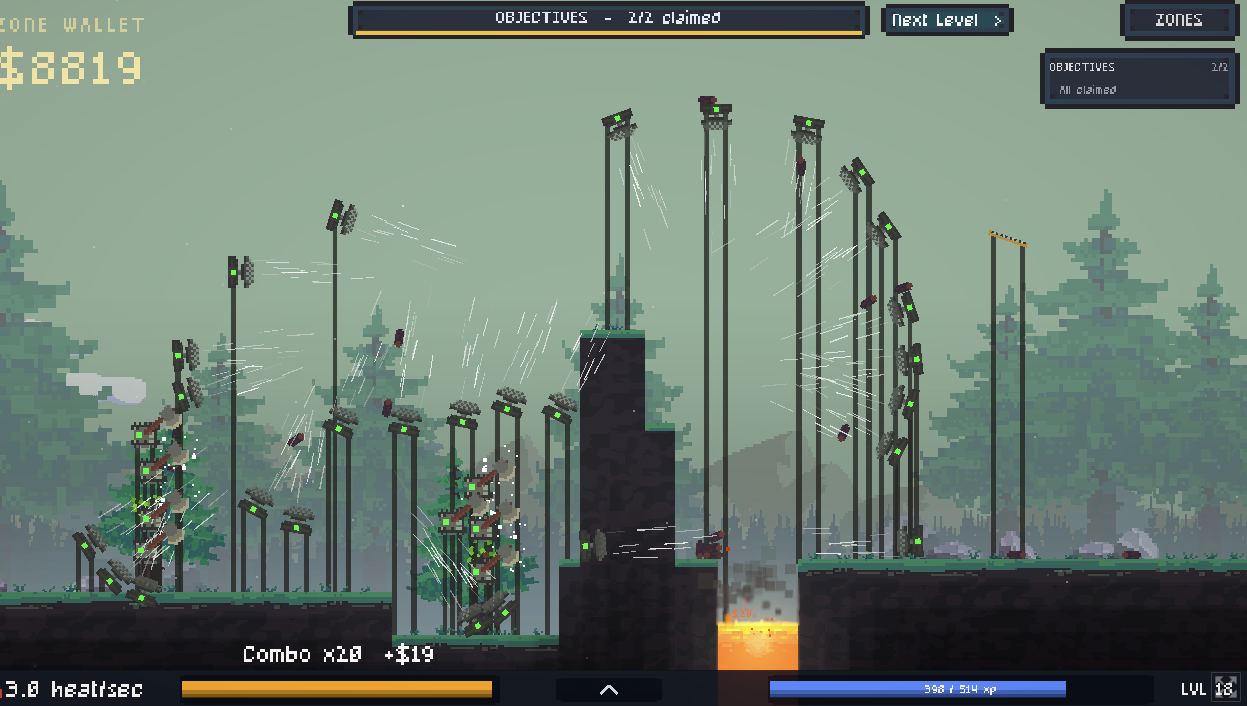
really fun! would love more levels, maybe tools to process wood could be cool also
thank you! yes many more levels planned and processing tools too :))
really fun game! this would have been a classic newgrounds game 10 years ago, well done!
thanks so much! i've been considering trying to get it on Newgrounds, maybe i should go for it....or am I 10 years too late lol
definitely not too late. not as many people use the site as before, but the vibe of the game is there. though 6 levels is maybe too few for a demo there. you should still be compensated for your work. its a hard line to walk. most people put games online for free back in the day, but then it was mostly for fun.
interesting! i'll have a look at it :)
Finished demo.
1) Panels are one of the most useful tools. They allow to store a huge amount of logs and let them burn all in one go. Just select the panel holding the logs. It automatically moves it and let the logs pass.
2) Slides are horrible to use. Because the game physics counts pixels, if they are not properly aligned, the logs will stop sliding when they intersect.
3) Fans can be used to move logs instead of using the mouse grab. Mouse grab is terrible, because the logs keep moving freely. Prefer to use the fan to sweep the logs.
4) Trampolines are glitchy. Their hitbox allows logs to pass through when there are multiple logs colliding at the same time. Also, they become unselectable when covered by logs.
5) Even though each level requires some brain, the easiest way to beat any of them is to let it run for some time, buy a large amount of tools and them finish all quests/objectives.
thanks for playing and for the feedback! will look into the trampolines as that seems off. Also yeah the slides things, there's one thing i could try without making a whole snapping system which im not sure i wanna do lol
Really fun game you did there...again! <3 Love that you can build and play around with the items. It's crafty and allows creativity and I enjoyed coming back every time. To all the others, check out Sporbs as well! It's awesome. Love to follow your work. Keep on doing this! Cheers, Jule
Ah thanks so much Jule! <3
Great game, very fun acually, continue what you are doing. I had some free time and I did this the max amont of logs floating in the air :)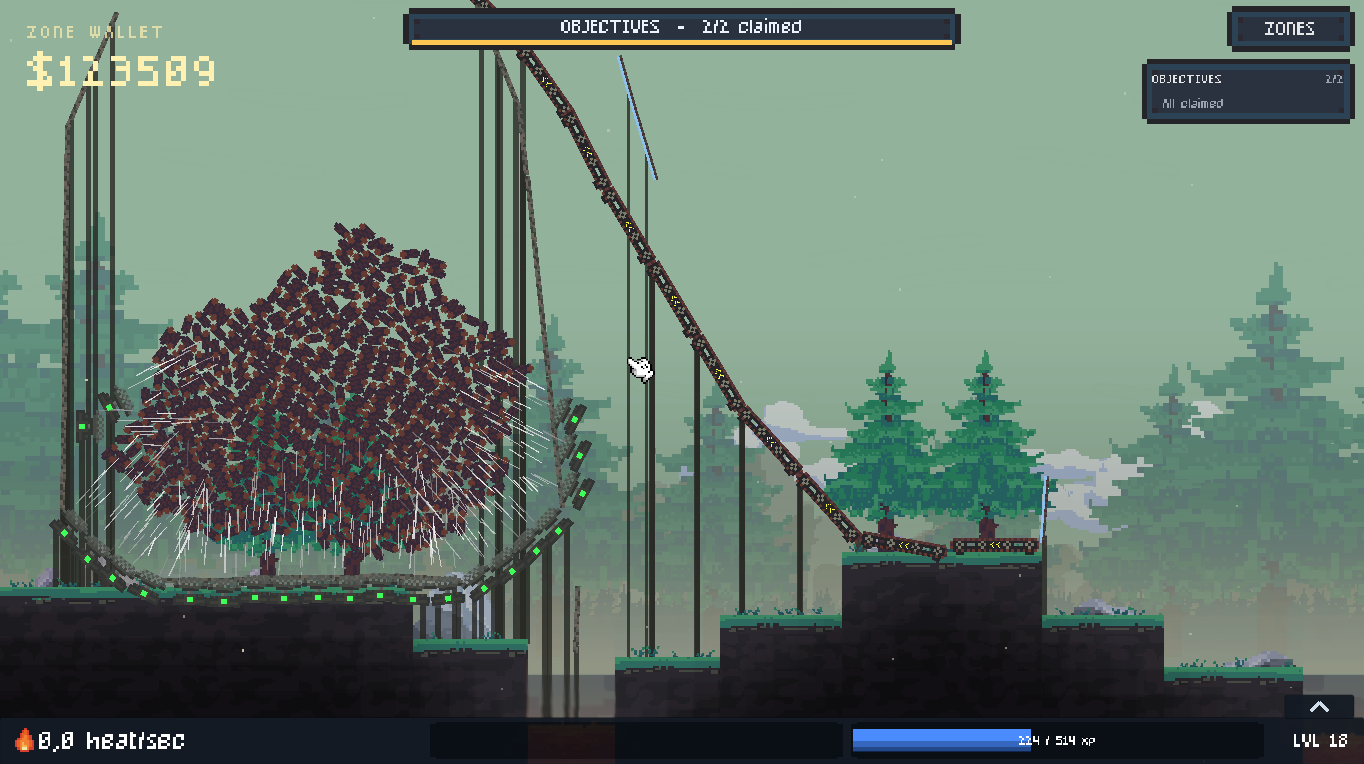
omg ahahah i want to see a video of that..i did somethign similar like a washing machine with fans - yours looks much more impressive ..
Thanks :)
to be hoenst I used this strategy to cheese some of the challenges cause the "reach 2/s" an such challenges only look at how many items are burned in a given time.
so if you steadily harvest each one and dump it, one after anotjer.
or just collect 100 in a pile and then delete a slate to dump them alla t once into the fire dowesnt matter.which aenugh planning and collecting, you may be able to cheese the "keep >2/s for 15 sec" things too.
jsut collect a ton of things in a container.and then open a slit that is chosen in a way that just enough of them roll into the fire at once to keep the needed frequency going.
good game
<33
Fun! IMO wants a bit more complexity in chopping and some more diverse objectives - the heat/s targets are basically just "put 4 auto-choppers on each tree and max out auto-chop speed", which feels kinda formulaic.
valid. i'm looking at adding a bit more complexity to this going forward for sure - along with adding more tree species with different density logs (more processing needed, longer to chop), a good idea someone mentioned is to experiment with adding different sized trees within each species, allowing more or less choppers to be placed there, with more space in-between trees needing more complex routing and bigger builds - as an expample!
thanks for the feedback!
Most fun I've had in weeks dude. Please keep creating and building on this game and things like it, it has huge potential. You have the midas touch. It'd be cool to have more precise rotations and maybe some items combos that force you to be really creative also. So excited to see the full thing, this deserves to be the next poly bridge/scritchy scratchy game for sure.
thank you for the kind words! really glad you enjoyed it :))
and for precise rotation, i added some more control in the patch yesterday, you can hold SHIFT+Q/E for extra fine rotation, also if you prefer you can toggle on using your mouse scroll for rotation when you have a tool selected!
Really fun, allows for creativity and mistakes.
Sadly logs start disappearing beyond a certain number (or maybe it's timed). Also couldn't reliably get trampoline to do trampoline things (like going up on the fifth map). You can still get the results with conveyors or slides + fans, but I was kinda hoping I could just bounce stuff over the obstacle.
ah yeah i did set a limit for the web build to keep things running smoothly (400...) - i will expose this in the settings so people can bump it up if they want!
it can be fiddly and not the most efficient (but is fun) but did you try shooting them at the trampolines with fans? you can make a funnel and direct them into the trampolines at the rough angle you want, the faster they hit the trampoline the further they bounce! would be hard to complete the required objective with this method but could be possible...
I messed around with it a bit more. Overall, I mostly figured the idea is to use "not that many" tools (maybe due to that one objective requiring use of no more than 4), so setting up physics machines all around just to make trampolines do fun things seemed like an overkill. Now that I've tried it, yeah, it can work, but it's still very inconsistent. Hit the edge of the trampoline and all the momentum dies. Log is rotating during flight - more landing randomness. Two or more logs? Collisions mid-air, collisions on the trampoline, collisions everywhere. And once a trampoline messes up a single log, more will come and things will eventually break.
They work okay for dropping logs down a cliff and bouncing them at 45 degrees or something (as long as there's not too many logs), but for anything else I feel like I need to get the logs up first to get enough gravity for falling logs to make decent use of trampolines. If I use fans for vertical momentum, I don't have enough horizontal, if I use them for horizontal, I lack vertical and at that point I might as well just slinghshot things with a single fan and a slope. I tried going through the game by only using trampolines, but it's a bit tedious. I can't even guarantee the first log dropping properly on a trampoline right below the tree, because the position, orientation and velocity of spawning logs are not consistent.
Other than that a button to remove all tools would be nice, like there's one to clear all logs. And some sort of tutorial/tooltip on how experience is awarded, cause I haven't seen anything about it. And while exp for finishing objectives seems somewhat obvious, even if it's not written anywhere, exp for combos of 5x and above for the first time it's reached in a level was unexpected.
i'll add an option to remove all tools to the right click context menu - and yeah, i didn't communicate the new combo pb xp bonus you are right! Partly because i'm not sure about it as a scalable idea so might drop it and introduce something else, but yeah not good to have systems which aren't communicated!
Nice game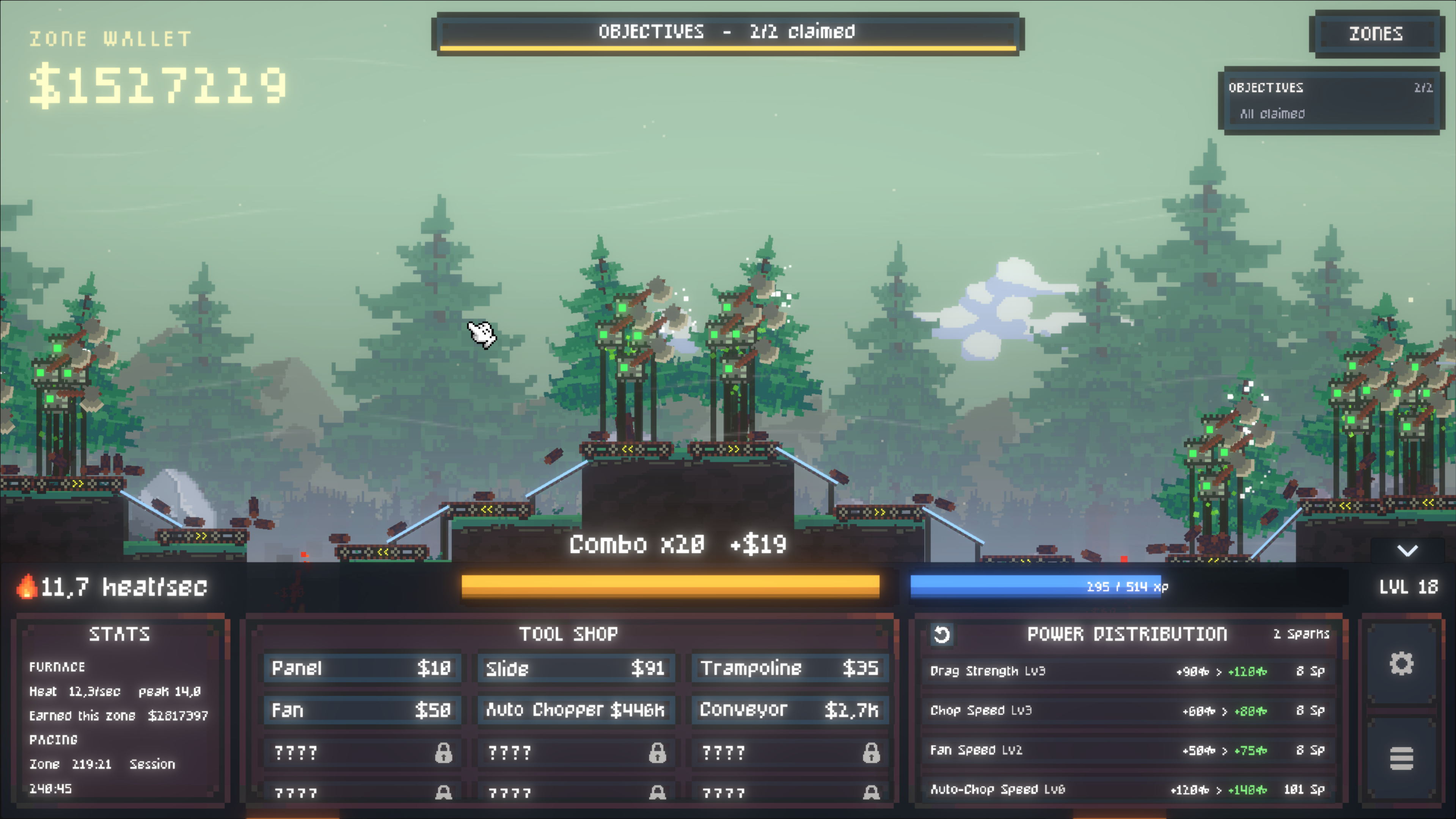
thank you <3 and thats some serious cash you've got there! 11.7 heat as well ey...
good game, very enjoyable
a few things I noticed
I wasn't sure how to use the fan at first (the button is small and fiddly compared to the placing) so I deleated it and it counted tward the "earn $" quest, allowing me to cheese that quest (after more testing it seems to do this with every item)
while not needed I'd like a sensitivity slider for the mouse(like the bloom and shake sliders), as of right now it slightly lags behind where the actual mouse is so it can feel floaty at points, that makes it harder to control where the mouse sits and it makes a few misclicks feel slightly annoying
ah thanks so much! that's a great catch i've not noticed that one! and yeah i'll add some cursor control into the QoL settings that'll hopefully help - i think its what i'm doing to replace the system cursor for the in-game one thats making it floaty i'll see if i can fix it up a bit
great feedback - thank you
Hey so i believe i fixed the cursor drag in recent patch! and the "earn X" cheese i sorted too - thanks for heads up!
Having fun with this game, great work. Many QOL features already been told in comments, hope to see some of them in full game
Got a weird bug: i don't get any XP during stage since i reach x20 combo and until i change stage. So change stage -> combo 1 through 20 gives me xp, then have to change stage to get any xp again... but i guess i can keep log income slower to grind levels for now
P.S. I did more testing and it's not only x20 combo. Every new bit of xp requires you to make combo at least 1 higher to get until you switch stages. Quite specific behaviour, but looks strange, so i still think it's a bug
Ah yes you're first to notice this bug! (that switching stages resets your xp gain on reaching new combo pb) - currently fixing this!
but yeah it was a design decision to make it so you only are rewarded on reaching a new combo pb, so that players couldn't just sit in an automated zone gaining infinite xp when combo-ing...so in early game you're rewarded for reaching a new combo.
thanks for the feedback!
Hey bug been fixed in recent patch! thanks for the help :) and as it stands, each zone has its own max combo pb record, so you get XP if you improve it - not sure if this will stay but for now thats whats going on
The game you released is amazing. Please finish it faster—I want to play the full version.
thank you so much <3 I will try my best haha
Having fun with the game so far,but the selection function is tripping me up bit.Every time I buy something,I ended up buying more than I want because the game still thinks I am still buying stuff,and as others have brought up the delete function is handy but gets annoying later on in the game.Other than that,I am having a wonderful time
EDIT:
also this is just me,but I personally suggest adding the ability to move across the screen using the mouse.Kinda gets tedious using the keys
to cancel the next tool purchase you can right click (i think i need to add that to the control tips tbf..) - also you can using middle mouse drag/right click drag to pan the camera if youre using a mouse! but this makes me think maybe it should pan if your cursor goes close to the edge of the screen or somehting)
i'll be putting a patch out tomorrow with a load of QoL improvements which improves the delete box and a load of other stuff!
Thanks for the feedback!
Aaaah thanks 👍
Especially annoying when you buy fans.
you are in buy mode.
you click somewhere to place fan.
you now wanna activate the fan, trying to click on that one miniscule pixel that turns it on.
you accidentally place a second fan.
you right click a bunch of tiems to remove the additional fan.
gotta be careful though that you dont click another time, accidentally clicking remove on the original fan too...
so yeah, can get a bit annoying.
or after buying before you do anyhting else, gotta right click on soem epmty land soemwhere before you do toher things.
hey would you like an option in the setting menu to turn off buy-mode after a single tool placement? could be good if there are other people finding this frusstrating!
maybe, actually not too sure on how to solve the issue.
Maybe have space for the "cancel selection/buy menu/anything"?
but that would require keyboard button. but alas you use wasd to move camera anyways.
just have left click be left lickk as ususal, right click for the "contect menu".and space to cancel any selection or whatever may be going on.
some people may hate having to use both hands but you cant make everyone happy :-)
at least it would make things easier.
and yeah, likely havign it be a single purchase eahc time might make sense since unlike other games, you arent really like placing multiple objects in one line or soemthing, so that extra click before each new purchase wont kill anyone.
you basically place items one at a time anyway.
should howeve,r evne if you are not in the buy menu, still rmember the last orientation of conveyors and such that you last used.
so upon next purchse you dont have to rotate to the same angle eahc time but it starts at that last angle by default.
Also amke the hit box of then fan activation bigger/better fit it with the visual button :-)
hey i improved the delete section in recent patch and other QoL - check it out! as its come up a couple times, i'm considering adding an option in the settings for the buy mode to turn off after one purchase - if people want to!
Oooh Yes!This is much better!Thank you!
After you pointed you,I could turn off purchase mode using right click.It has gotten easier for me(Especially helps since right click can be used to look across the screen),though having that option would be helpful.Or have right click thing be more clear
I do also have another minor complaint.Whenever I pick an object,and carry it somewhere else using the wasd/arrow keys,the mouse gets misplaced and I have to grab the object again.It's not a big deal but it's kinda annoying
Insanely fun to play, 10/10!
ah thank you so much <3 glad you are enjoying it!
It is a really good game. I like if it had a upgrades for the cursor so that i can pickup multiple logs with one hold. The button on fan is so small to press, i really have to zoom in to press it. By far it is an amazing game!
thank you! ive got that exact upgrade on my list haha..and in next patch i've improved how you interect with turning tools on/off and more QoL
nice sandbox incremental, but im concerned at how late-game is going to be in terms of difficulty/build adaptations, seems like 1-2 meta's will carry me through the game, unless there are some optional objectives forcing me out of them. Still, needs QoL's
cheers
this is some really great feedback - thank you!
working on QoL for next update so much of this will be fixed/implemented. I'll be making the right click context menu much more useful in general , and adding more options to the settings menu for greater control. Yes combo cap among other thigns will likely be perma upgrades as part of meta progression for full game - yeah i need to make the sell area much less in the way or/and add option to get rid in general - the 3 star point is a great catch.
yep, basically slides and conveyors brign you all the way.
and even in the "bring logs over the mountain" kind of level, neeeded like 1 fan and the rest all conveyors.
you should probably add restrictions and stuff in some levels, like conveyors banned, can only use 4 fans max and such
hey yeah, i will be leaning into the restrictions a bit more for required objectives - for this early version i wanted to not punish players too much so i can test base systems and ideas!
hey just wanted to say i've added most of what is here in your feedback in todays patch! thanks for the super useful feedback, definitely better now
I Love 90% of this game. The tools can be used in many creative ways, such as launching with trampolines or combining fans to have large projectiles across the map! It was fun finding different ways to do the same levels. Some strategies I chose I did for fun and not efficiency. My flaw with the game is that levels don't necessarily provoke unique challenges. I would love to see more levels in the future that outright removed the use of specific tools, such as no conveyors, panels, etc. Varying combinations of these could be fascinating as long as it's not overdone. It was feeling a bit repetitive with the single goal as well, so I would love to see different wood types that need to be put in specific holes. Forcing players to sort wood, create more complex systems, especially if a situation forces those would type streams to cross, could open up for some fun problem solving! Where it's at now, I give it a 3.5/5 and I that's mainly because it's a demo, as I imagine the full game will be even better!
thank you for the feedback! i'm glad you had fun with whats there at the moment :) so the plan for later levels are for it to get a bit more challenging, with as you say more restrictions (trying to not overdo this), but also varying tree species which will require more complex systems to sort etc
On some levels the refund area gets in the way of moving things. Other than that its really fun!
yeah for sure, it annoys me sometimes too, i had it in the top-middle of the bottom ui bar before and that was worse, i wonder where would be better or if its needed at all?
and thank you! i'm glad you enjoyed it :))
You can try putting the sell option in a button, like the rotate buttons.
yeah it is already with Backspace/Delete, but true i don't think i say that in the controls section..
Also a thing sightly annoying:
If you "hold" an object, use wasd to move camera.cause you wanna place the thing in a lwoer area currently not yet on screen.and the obejct doesnt move along with the camera.which leadsto you still holding the thing (of corus e assumign you kept legft mosue pressed during the whole ordeal)but it is not on screen anymore cuase it is still in the area further up off screen.
so yeah, when camera is moved the object should in my opniio move together with the camera if held (aka left mouse held down)
at least thats the behavior I am used to. that the objects basically is anchored to the same viewport coordinates unless the cursor moves it within the viewport no matter which in game area the viewport shows.
or soemthing. hard to explian. but if you hold an object aon screen and move the camera aka viewport is moved the object showd be moved in the same way so it stays viisually in the same spot on the viewport even if it's game world coordiantes have to change.
cause otherwise moving stuff around from one end of the "world" to another becomes a PITA.
like drag object to the right , drop it. nove camera a bit too the east.
drag and drop object wihtin viewport, move viewport,e tc.
PITA.
should be able to have held object jsut move alogn with the viewport.
hey yeah i think i'll add as option, as it used to be like how you describe you'd like it and then i changed it to what it is now after some feedback lol - i can see players liking both ways - maybe the camera should also pan if the cursor gets close to the edge of the screen, so if holding a tool it would do that as well?
hey just wanted to say the refund area got improved in todays patch! thanks for the feedback :)
Nice! Combo meter at the start feels a little too quick imo
good point, could try lengthening it slightly!
It made me feel some slight panic when trying get the 4x combo lol, felt like I had just the perfect amount of time, which could give newer players a bit of a tougher time at that part only reason why I brought it it up, also love the art style and the game design choices btw!
thanks so much!
Ebery time I try and drag the logs, it just makes the square selection tool completely breaking the combo. ITS SUPER FRUSTRATING!
zooming in can help with this to get more precise, but i feel you, perhaps i need to make the collider for the dragging slightly bigger - you are not the only one finding this frustrating!
hey in today's patch i've improved the cursor feel and is easier to grab logs now, also i moved the box-selection to SHIFT+DRAG instead - thanks for the feedback!
Dropped the ball by introducing conveyor belts too soon, now every level is just make some money until you get enough money to buy conveyor belts and auto-choppers and your done.
I am curious though, I do wonder if there is anything left to unlock that will actually top them.
thanks for the feedback. yeah plan is to introduce new tools, zones and more challenges where just using conveyors wont get you by, but they will always be a staple routing tool.
how do i beat idle tower i cant see a way to get the logs up that high with my starting funds
also this is not really a idle game
(assuming you mean 'pine tower')there's a few ways to do it, i usually start with the left tree to get some income going and then go from there, you can also reverse the direction of the conveyors by clicking the yellow directional arrow on the tool which may be useful for this!
re idle or not - it has idle elements, so thats the only tag offered, i would choose semi-idle if possible
yeah i ment pine tower
and i really do not see how to get a log up over the tower with machines
i cant afford enough Convery belts to get it over
you can always build out of other tools to get some income going - also if you get 3 stars on the previous zone, that will give you extra money for the next zone
Try using slides and fans at first. And when have money, change slides for conveyors.
Also as others imply, jsut a slanted slide and a fan to the left, with same direction as the slide, beneath the log spawn point make kind of launch paltforms easy that jsut yeet logs for a bit in the direction the slides point.
so you could theoretically jsut yeet log bit by bit thorugh the air, fron one launch pltform to the next till you reach the goal.
wasnt smart enough to come up with that before I wass already up to the conveyor belts but definitely a possibility :-)
frist off since the games start you can jsut drag logs into the fires of muordor yourself.
inefficient but way to make money bit by bit.
and after that, use fans, trampolines and such.
and later you discover how easy and way more controllable stuff with conveyor belts is. :-)
Really enjoyed it!!
thank you <3
shop is way too easy to miss might wanna start with it either open or change the arrow to the word shop spent way too long thinking i had to complete the 4x combo which felt almost impossible in order to unlock it
oh interesting! Im curious, what felt impossible about the 4x combo without the shop? this is a valid insight, i had thought showing the shop from the start would risk overwhelming someone initially though.."arrow" -> "Shop" makes a lot of sense
only being able to move 2 at a time at the start made me have to quickly try to push 2 batches in but logs were super difficult for me to quickly click onto more often ended up dragging a box than actually clicking and dragging a log so wasnt able to actually do the 4x without putting down a slide
i see! zooming in can help with this to get more precise, i will look at making the collider for the dragging slightly bigger
Hey so i reordered the tutorial a bit, so it prompts you to open the shop before 4x combo task , and moved the shop arrow the midle + the whole bottom bar is clickable to maximize the panel - much better! thanks for the feedback :)